 |
 |
|
 |
 |
The Good
Go read Kindle propaganda here. It's mostly accurate.
Even though it's not an MP3 player it plays music which is nice because it's one less device to carry. I don't need some massively multifunctional machine. I'd get an ipad or a laptop or something for that. I can see why people are happy about color but I don't really need color from Nook.
The Bad
PDF reading. They need some sort of PDF reformating program or an easier way to navigate PDFs that you had to enhance the size on to read. (I know it's not a PDF reader but it's terrible unless you reformat the file)
The 5 button navigation system is awkward
Browser is pretty slow but it's not a multiuse device so I guess it's okay.
Collections Management is awkward.
What I want for Kindle
I want some sort of SharePod like program that allows me to do all the collection making on my computer. I really really hate making collections on the Kindle. That 5 button scroll thing is awkward at best. The reason why I prefer a SharePod over iTunes is because SharePod is something that you could put on your iPod and use anywhere on any computer without involving someone else's Library. I want it for my personal documents not my Kindle books which I know I can synch from the web.
Edited for Kindle Collections Manager. This is still in beta and requires an install but overall it's made my experience with collection making a million times easier. Wish it'd identify Mangle created folders as well.
Japanese Ebooks at Amazon JP or Amazon.com. Right now I basically have to go to 3-4 different E-book stores for manga and novels. and try to find one that is reformatable. XMDF is not reformatable. Kindle doesn't do terribly good with EPUB. If Amazon could consolidate the E-book format in Japan it'd make me so happy.
DEAR AMAZON, SELL JAPANESE E-BOOKS.
More formats and better conversion tools.
While I do buy most of my stuff from Amazon, the Japan situation has made it really difficult for me to format everything. I want the Kindle to read EPUB .BOOK XMDF
What I'm enjoying using the Kindle for
English Novels. Durr. Amazon.com
Japanese Novels on Kindle. I love reading in Japanese. I know that Amazon will have a hellish time accessing the Japanese market (given how restrictive the publishers seem to be) so for now I am sticking to Aozora Bunko and some of the less legal sources. A 400yen book goes for about 10-12 dollars in the US if you have to actually order it, (from Japan; in a US bookstore it is much much less.)
Manga
I use Mangle. Sometimes it degrades the images a bit too much but overall it makes the formatting process a lot easier and maintains enough quality. The Kindle however will not carry that many manga. There are plenty of sources for manga on the web. I use Kyoto Music City and Winny Club. Guide to Mangle.
Formatting Japanese for Kindle
The Kindle 3 can read Japanese natively but most Aozora Bunko and text format novels have (rubi) markings which make reading like that hard. Converting them to PDF is really easy with Aopii.
For Novels with Aozora Bunko markings
For straight up Aozora Bunko, there is a free service here that will make your Bunko into a readable format for Kindle.
For some less legal novels.
Use Microsoft AppLocale if you are too lazy to set your region to Japanese for the text file. Set the encoding to UTF-8. If you have set your region to Japan, you probably don't have to change encoding.
Use Aopii PNG to encode the text file with the rubi correctly inputted or use Aopii PDF.
Both Aopii use Java RE. Aopii is a .JAR file
For the PDF version you will need to download and use a different font, the default option doesn't work. for my American Windows XP. I used IPA Font Mincho.
For XMDF Format Novels
XMDF is Sharp's format for E-books and is also the most popular format for E-books in Japan. Unfortunately or as expected, Amazon does not support this format. Neither does Calibre. There are users in Japan however who made some guides to how to convert XMDF to an image format (I then use Mangle to condense it a little more.) Hopefully, someone will make a program that would streamline this process a bit more.
- Download ブンコビューア for viewing XMDF files on Windows PC
- Download AutoHotkey or UWSC and create a script to take screenshots and save them to a folder. (See here or here for UWSC scripts. personally, the 2nd script was easier to use and customize.)
- Trimming. I use Ralpha for trimming. You can use your own programs or use the Linux script from the above link (I don't really know much about Linux so I don't know if that method is faster or more effective.)
- Further formatting using Mangle to reduce size and greyscale it better. You can also convert the folder to PDF if you want but I'm perfectly fine with Mangle folders.
The entire process takes around 15-20 minutes for a thin Bunko book according to one of the guides.
Other thoughts.
I was reading Jコミ and was thinking, why don't/can't Japanese artists whose works aren't published anymore take advantage of Kindle Direct Publishing. It's not limited to just Kindle because the software reads on iPad, IPod, PC, so forth which makes it superior to the .book format I keep encountering or the T-time formats.
While Amazon takes 30% royalties, having something on Amazon would be great publicity for older works that publishers aren't publishing anymore to receive more revenue. It just makes more sense to me than the advertisement revenue via JComi. If they made a good Japanese platform they could easily tap into the thousands of doujinshi manga artists for whom paper format is more expensive than digital format.
Links
Kindle Store
Blog Kindle is also pretty informative for other hacks.
青P Aopii for formatting Aozora Bunko formatted texts into images with correct rubi
Mangle for formatting images
Instapaper for reformatting webpages for reading on Kindle
星空文庫 Hoshizora Bunko
青空文庫 Aozora Bunko
Project Gutenberg English version of Aozora BunkoLabels: Guide, Manga / Novels
|

wrote at
8:31 AM
on
Sep 23, 2011
|
My friends told me how to bypass the Gateway for Dragon Saga!
I discovered that my problems with installing Dragon Saga were not because of the DDOS but rather gateway related issues.
Gateway itself is a cool looking program with little functionality, much like the WarpPortal payment system. It's another sign of ignoring the basics of business; never make it harder for your potential customers to touch your product. Hopefully, gravity will fix the issues that the Gateway has or add their own bypass to it.
1) Create a new txt file in your C:\Program Files\Gravity\Dragon Saga
This will differ according to where you installed to but that's the general address
2) Edit it with notepad with "start Patcher.exe Gravityus" (without the quotes, case sensitive)
3) Save the txt file with any name. I chose "GatewayBypasser.txt"
4) Change the extension to ".bat"
You can view extensions under Tools/Folder Options/View/ and uncheck Hide extensions for known file types
5) Run "GatewayBypasser.bat"Labels: Dragon Saga, Guide, WarpPortal
|
wrote at
8:35 AM
on
Dec 4, 2010
|
WarpPortal was unfortunately one of the worst implemented ideas of iRO's management. It's a great idea for people who play multiple MMORPGs from gravity, but it's ignoring one of the fundamentals of all businesses. Never make it harder for customers to give you money.
Oh you have to wait a few hours for them to vertify your credit card as well. It says 24 hours but if it's a weekday it'll be much shorter.
The gist of the system is that you purchase WarpPortal Energy which is then converted to subscriptions or to Kafra points.
Start by going to WarpPortal Website.
The Login button is on the upper right corner and the Registration at the bottom of the login page.
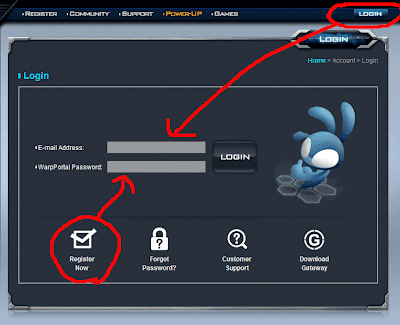
Once you have logged in there will be 2 options of interest. PowerUp and Game Accounts.
- If you are a new player or a very old player, you want to go to Game Accounts and register your game account or attach your game account to your WarpPortal account
- If your accounts are attached to your WarpPortal account then you will just want go to Power Up
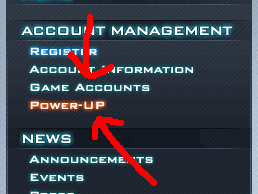
The PowerUp tab looks like this.
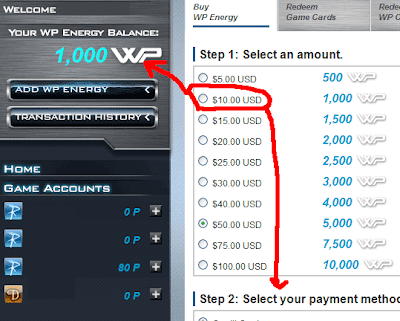
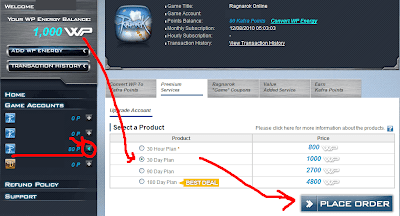
Here you can purchase WarpPortal Energy which can either be converted to Kafra Points/Subscriptions to any of the Gravity Games. You will see your total WarpPortal energy to the top left. Any ingame points next to your account name to the bottom left next to the account name.
For ingame Kafra points chose the account you want the points on under Game Accounts and select the amount you want to convert. Once it is converted you have to use it up on that account.
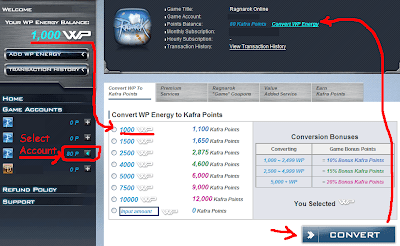
To pay for your subscription chose Premium Services and insert your desired play time
 Labels: Guide, Ragnarok Online, WarpPortal
|
wrote at
12:00 PM
on
Oct 23, 2010
|
|  |
 |
|
 |
 |
|


