|
 |
|
 |
 |
If you are like me and hate your pet
go to
C:\Gravity\Ragnarok Restart\data and find nospam2.cfg
Open this file with notepad and update as necessary.
If it doesn't work go to
C:\Gravity\Ragnarok Restart\data and find nospam.cfgLabels: Ragnarok Online, WarpPortal
|

wrote at
6:21 PM
on
Jul 18, 2017
|
Application has failed to start because its side by side configuration is incorrect
Download all 3, then install in order 2005, 2008, 2010
Even if you THINK you have them
install them anyway.
http://mirror.irowiki.org/ragnarok/fullclient/vcredist/
Labels: Ragnarok Online, WarpPortal
|
wrote at
10:57 AM
on
Jul 7, 2017
|
Warpportal Website is a terrible website that causes many problems
Problem 1) Why do I have to wait 24 hours?
If you haven't paid for anything in the past you will have to wait 24 hours until you can purchase anything. The primary reason for this is fraud prevention. Please just wait 24 hours. If you still cannot purchase please contact them using the Support function
Problem 2) Payment Error
- Solution 1) Please disable your adblock
- Solution 2) Please try Internet Explorer/Firefox
- Solution 3) Please try from your mobile device
- Solution 4) Please use the support system with Warpportal.
Labels: Ragnarok Online, WarpPortal
|
wrote at
10:37 AM
on
|
Ragnarok Online is a very very old game created to allow data to be sent by using low levels of bandwidth such as dial up. Because of this, it has multiple inefficiencies which add ping to your connection.
Since it's 2017 and I hope by now everyone playing RO has evolved from AOL.
This is called TcpActFrequency which may or maynot help with latency.
Before https://www.youtube.com/watch?v=zYcgxyTKT4M
After https://www.youtube.com/watch?v=94F-Xrw6clA
To enable this
Enabling Message Queuing.
1) Go to Control Panel
2) Open Programs and Features
3) Turn Windows Features On/Off
4) Tick on Microsoft Message Queue (MSMQ) Server Core or MSMQ Services or Message Queuing
5) Click Apply
Registry Tweaking
Before messing with your registry.. click on the File and make a copy of your registry on your desktop.
1) Click on Windows Icon/Start
2) Search Run
3) Type in Regedit
4) Find your Adaptor ID. You need to go to the ID that has your IP Address on it.
Browse to
HKEY_LOCAL_MACHINES\System\CurrentControlSet\Services\Tcpip\Parameters\Interfaces\\
5) Right Click on the Registry and create a new Dword value named TcpAckFrequency and set its value to 1.
6) Browse to HKEY_LOCAL_MACHINE\Software\Microsoft\MSMQ\Parameters\
7) Add another DWORD Entry named TcpNoDelay and set its value to 1
Restarting Message Queue Service
1) Restart your computer.Labels: Ragnarok Online, WarpPortal
|
wrote at
10:27 AM
on
|
Have a problem with Warpportal Game?
Here's a Guide to take you through the sometimes confusing world of Warpportal Support
Warpportal Support has a SEPARATE ID than your Warpportal account. This is because when you use Support it's because your Warpportal account can be blocked.

There are 2 Methods of Posting Tickets at Warpportal Support
- With a Support Account
- Without a Support Account
If you want a response for your Ticket it is HIGHLY SUGGESTED that you create a Warpportal Support Account.
FAQ:
- How long does it take them to respond.
- Wait 5-10 Business Days and then contact a CM via the Forums with your ticket number and how long it has taken for a response. Give said CMs time. I suggest you seek out whichever one is posting most frequently in stickied topics to ensure that they are active CMs.
- How do I view a ticket I made without a Support Account?
- I want to report multiple issues
- Write everything related in a single Ticket in a Bullet Point manner so it is easy for the GMs to read. Try not to make multiple tickets. Multiple tickets clog up the system unnecessarily.
- Example 1: I was banned on XYZ account because I made multiple accounts. Make a single ticket list X, Y, and Z
- Example 2: I am reporting ill mannered behavior KSing and I am reporting botting. Is the botting related to the KSing? Then make a single ticket. Is the botting and KSing not related? Make 2 tickets.
- What does Banned to "2014" (current year if I forget to update this ever again) Mean?
- This means you were banned for ill-mannered behavior. Wait it out. odds are your ticket time would outweight the actual unbanning.
- What does Banned to "2020" mean?
- This is a temp ban waiting your response regarding the issue. This is often a general ban where you may have been flagged for suspicious activity. You need to do a ticket or it'll be a perm ban.
- What does Banned to "2067" mean?
- This is a perm ban. Usually there is little to no hope against this ban. It means you were caught botting or some other very serious offense like loving a Maple as an Alpaca..
Step 1 :
Go to Warpportal.com and Click Support
Step 2 :
If you wish to do a ticket with a Support Account chose Register
If you wish to do a ticket WITHOUT a Support Account chose Submit Ticket
If you already have a Warpportal Support Account chose User Log-in
Step 3:
I am assuming you know how to Register an account.
Once you are logged in your screen will change slightly as below Click Submit Ticket.
Most people try the Support system when something bad has happened so odds are you want Account Suspension, Item Recovery, Steam Issues, or Payment Issues.
Step 4:
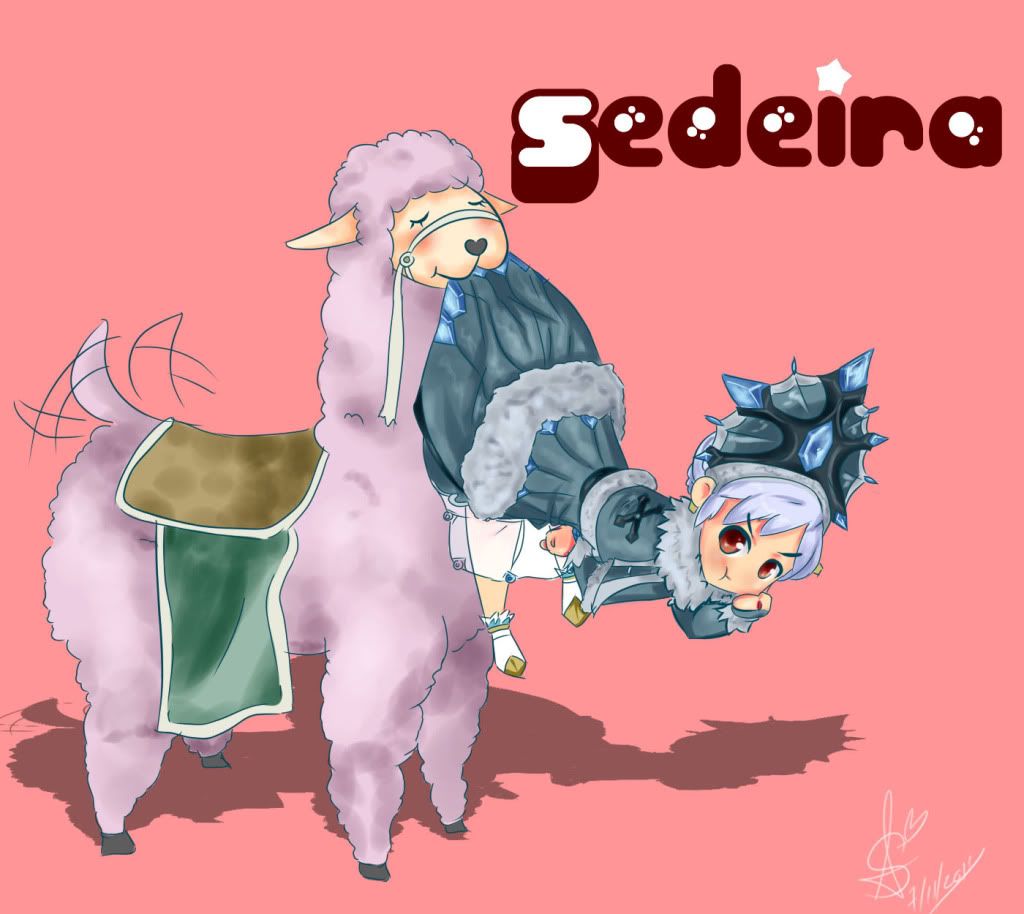
Post the Game and answer the questions. The below is an example of an Angry Alpaca and his illegal love for a Maple called Risotto
.As a general rule of thumb, explain in detail your situation, explain why Warpportal made a false ruling against you. Attach screenshots where necessary and submit the ticket. Do Not Rage. Be Calm, Explain everything that will help them make the correct decision.
Step 5:
What happened to my Ticket?
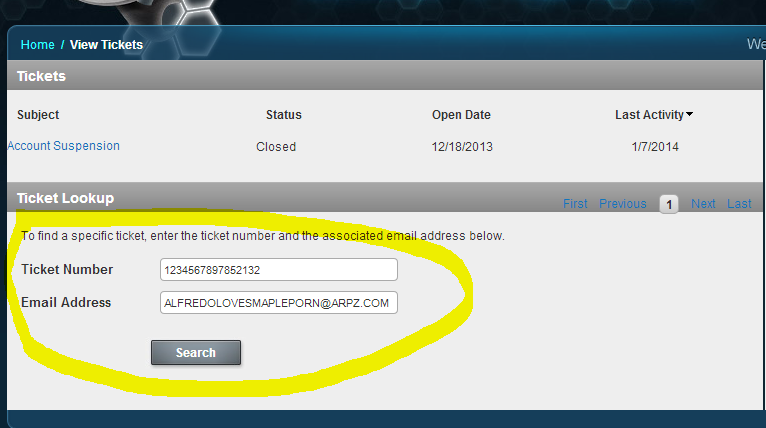
If you posted using a user account you can view your tickets as shown here. If not you need to make a Warpportal Support Account and then click View Tickets. You will have an extra task.
Step 6:
Link your ticket to your new Warpportal Support Account.
Include BOTH Email and Ticket Number to bring up your ticket and link it to your account.
Step 7:
Respond to Tickets by Clicking the Subject.
In general, you should get a response like this followed by a more detailed response later on
Timing depends on the issue.
You should respond to tickets in the same Ticket.
This allows Warpportal to see the entire history of a single issue in a single ticket and also makes sure they do not have duplicate tickets regarding the same issues.Making a new ticket does not make your issue be resolved faster. It actually makes it slower as they will be dealing with more tickets
Step 8:
Did you just dismiss Alfredo's Love for Risotto the Maple?
Did your ticket just Autoclose on you?
Go to the Top and Reopen the ticket regarding the issue.
YOU DON'T DENY MY ALPACA LOVE FOR RISOTTO RE-OPEN TICKET
Remember, Be polite. Don't Rage, Give GMs all the information you can. They want you to continue playing if it's an honest mistake...
Want to know more about Alfredo and Risotto?
You can see more of him Here, Here, Here, Here, and Here
You can also see a Fabulous Art of him by KittyPriestess (DevianArt) and Phayns (DevianArt)
Labels: Ragnarok Online, WarpPortal
|
wrote at
4:16 PM
on
Feb 11, 2014
|
My friends told me how to bypass the Gateway for Dragon Saga!
I discovered that my problems with installing Dragon Saga were not because of the DDOS but rather gateway related issues.
Gateway itself is a cool looking program with little functionality, much like the WarpPortal payment system. It's another sign of ignoring the basics of business; never make it harder for your potential customers to touch your product. Hopefully, gravity will fix the issues that the Gateway has or add their own bypass to it.
1) Create a new txt file in your C:\Program Files\Gravity\Dragon Saga
This will differ according to where you installed to but that's the general address
2) Edit it with notepad with "start Patcher.exe Gravityus" (without the quotes, case sensitive)
3) Save the txt file with any name. I chose "GatewayBypasser.txt"
4) Change the extension to ".bat"
You can view extensions under Tools/Folder Options/View/ and uncheck Hide extensions for known file types
5) Run "GatewayBypasser.bat"Labels: Dragon Saga, Guide, WarpPortal
|
wrote at
8:35 AM
on
Dec 4, 2010
|
WarpPortal was unfortunately one of the worst implemented ideas of iRO's management. It's a great idea for people who play multiple MMORPGs from gravity, but it's ignoring one of the fundamentals of all businesses. Never make it harder for customers to give you money.
Oh you have to wait a few hours for them to vertify your credit card as well. It says 24 hours but if it's a weekday it'll be much shorter.
The gist of the system is that you purchase WarpPortal Energy which is then converted to subscriptions or to Kafra points.
Start by going to WarpPortal Website.
The Login button is on the upper right corner and the Registration at the bottom of the login page.
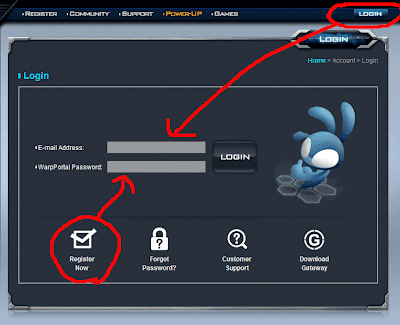
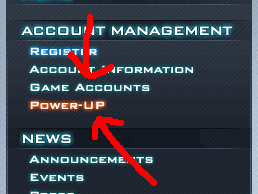
Once you have logged in there will be 2 options of interest. PowerUp and Game Accounts.
- If you are a new player or a very old player, you want to go to Game Accounts and register your game account or attach your game account to your WarpPortal account
- If your accounts are attached to your WarpPortal account then you will just want go to Power Up
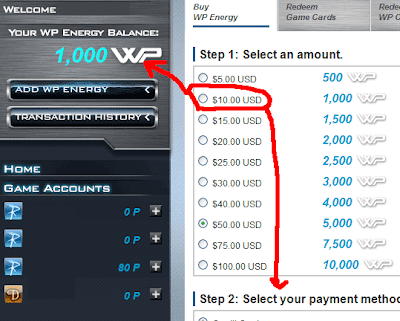
The PowerUp tab looks like this.
Here you can purchase WarpPortal Energy which can either be converted to Kafra Points/Subscriptions to any of the Gravity Games. You will see your total WarpPortal energy to the top left. Any ingame points next to your account name to the bottom left next to the account name.
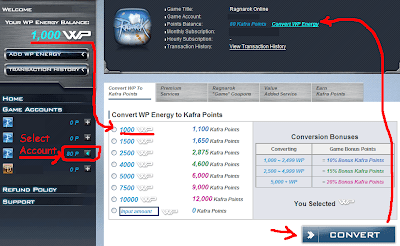
For ingame Kafra points chose the account you want the points on under Game Accounts and select the amount you want to convert. Once it is converted you have to use it up on that account.
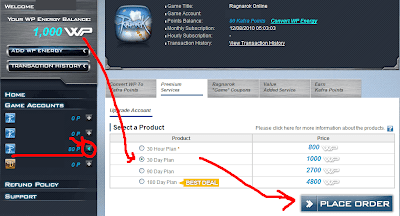
To pay for your subscription chose Premium Services and insert your desired play time
 Labels: Guide, Ragnarok Online, WarpPortal
|
wrote at
12:00 PM
on
Oct 23, 2010
|
|  |
 |
|
 |
 |
|